
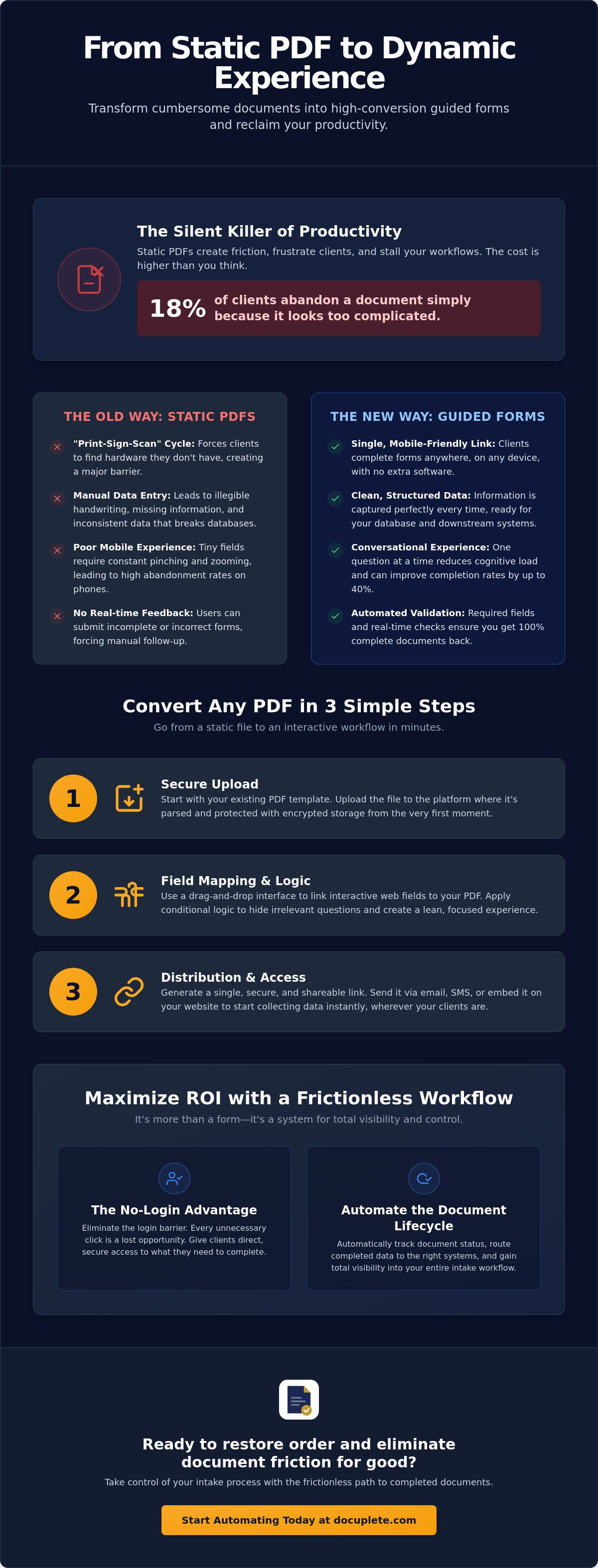
18% of your clients will abandon a document simply because it looks too complicated. Static PDFs are the primary culprit. They are rigid. They are cumbersome. They are outdated. When you convert PDF to guided web form, you remove the wall between your business and its data.
You already know that document friction is a silent killer of productivity. It leads to low completion rates. It forces manual data entry. It creates unnecessary client frustration. You need a process that is clean, structured, and professional. You deserve a workflow that prioritizes speed and accuracy over administrative overhead.
You need a way to capture information that feels like a conversation rather than an interrogation. This guide provides the pragmatic strategy to transform static files into high-conversion digital experiences. We will cover the shift toward conversational interfaces, the removal of the login requirement, and the path to faster turnaround times in 2026. It's time to restore order to your intake workflow and reclaim your time.
Key Takeaways
- Replace the cumbersome "print-sign-scan" cycle with a single, mobile-friendly link. Capture data where your clients already are.
- Master the three-step process to convert PDF to guided web form. Upload templates, map fields, and launch.
- Eliminate document abandonment by removing login barriers. Every unnecessary click is a lost opportunity for completion.
- Automate the entire document lifecycle. Track status, route data, and gain total visibility into your intake workflow.
What is a Guided Web Form and Why Does it Matter?
A guided web form is a browser-based interface that maps data directly to a PDF template. It functions as a bridge. It connects the interactive ease of a modern HTML form with the structured permanence of a legal document. This isn't a minor tweak. It's a total replacement for the "print-sign-scan" cycle. You send a link. The client provides the data. The system generates the document. It's that simple.
Static PDFs are dead weight in modern digital workflows. They are rigid. They are silent. They offer no feedback. When you convert PDF to guided web form, you shift the burden of accuracy from the human to the system. Validation happens in real-time. Fields are mandatory. Data is clean. You stop chasing missing signatures and start closing deals.
The goal is clarity. The result is speed. A guided form ensures that every entry is legible, structured, and ready for your database. It removes the guesswork. It restores order to your intake process. You gain control over the document lifecycle from the first click to the final signature.
The Death of the Static PDF
Static files are fossils. They require external software just to open. They demand a printer just to sign. This creates a massive barrier. It forces your client to stop what they're doing and find hardware they likely don't own. Research shows that 18% of users abandon forms because they're too long or complicated. A static PDF is the definition of a complicated form.
Mobile users are hit the hardest. Traditional PDF fields are tiny. They require pinching, zooming, and scrolling. This leads to frustration. Frustration leads to abandonment. Beyond the user experience, static files are a data nightmare. Manual entry leads to three specific problems:
- Illegible handwriting that requires manual follow-up.
- Missing data points that stall the entire workflow.
- Inconsistent formatting that breaks your downstream database.
The Guided Experience Defined
A guided experience prioritizes the user's focus. It presents one question at a time. This reduces cognitive load. It prevents the "wall of text" effect that causes clients to quit. You aren't just collecting data. You're leading the client through a process. It's a conversation, not an interrogation. Conversational forms can outperform traditional forms by 25% to 40% in many contexts. The logic is simple: less friction equals more completions.
Progress tracking is essential. Users need to know how much is left. A simple progress bar provides a sense of finality. It builds momentum. When the user finishes, they hit submit. There are no email attachments. There are no scanned images. The data is transferred instantly. You get the completed document. The client gets their time back. It's a professional experience that reflects well on your brand.
How to Convert PDF to Guided Web Form in Three Steps
Complexity is the enemy of completion. You don't need a bloated, five-step overhaul to modernize your documents. You need a streamlined path. To convert PDF to guided web form, you follow a logical sequence that starts with the assets you already own. It's a shift from manual chaos to digital order.
This process ensures your data is clean. It ensures your client is happy. It ensures your time is protected. You aren't just moving a document to the cloud. You are engineering a better way to work. Follow these three steps to eliminate document friction for good.
Step 1: The Secure Upload
Start with your existing PDF template. It doesn't matter if it's a multi-page contract or a simple intake sheet. Upload the file to your platform. The system parses the document immediately. It looks for existing form fields and layout structures. This saves you from building from scratch.
Security is non-negotiable. Encrypted storage protects your document from the moment of upload. This level of digital rigor is why major organizations use online forms to manage sensitive citizen data. Your clients expect the same level of protection. Once the upload is complete, your static file is ready for its digital transformation.
Step 2: Field Mapping and Logic
Mapping is where you define the experience. You link interactive web fields to the underlying PDF structure. Use a drag-and-drop interface to add data points. You can see how simple mapping can instantly transform your document speed. This is also where you apply conditional logic.
Logic removes the "not applicable" headache. If a client answers "No" to a specific question, the system hides every irrelevant follow-up. This keeps the form lean. It keeps the user focused. Research indicates that multi-step forms can have a 14% higher completion rate than single-page equivalents. By setting required fields, you guarantee that no document is ever submitted with missing signatures or empty boxes.
Step 3: Distribution and Access
Generate a secure, shareable link. This is your final product. You can send this URL via email, embed it in a client portal, or even text it via SMS. The delivery method doesn't matter as much as the access. Your client doesn't need to download software. They don't need to create an account. They just click and type.
Verify the output before you go live. Ensure the web form data flows perfectly into the PDF layout. Layout preservation is critical for legal and professional standards. Once verified, you have a repeatable, high-velocity asset. You've successfully moved from a "print-and-scan" nightmare to a modern, digital-first workflow. The transition is complete. The friction is gone.
The No-Login Advantage: Boosting Completion Rates
Every click is a chance for your client to quit. This is the hard truth of digital intake. If you want results, you must remove the barriers. Requiring a login is one of the most significant points of friction in the document lifecycle. It stops momentum. It creates frustration. It kills conversion. High-velocity businesses prioritize speed and ease of use over unnecessary administrative hurdles.
When you convert PDF to guided web form, you are choosing a path that respects the client's time. You provide a direct route from initiation to completion. You don't need a gatekeeper to ensure security. You need a streamlined experience that allows for rapid data capture. This approach is how you transform your business from a manual bottleneck to a digital powerhouse.
Psychology of Form Abandonment
Users hesitate when asked to create a new password. It feels like a commitment they aren't ready to make. It adds mental load. The "forgot password" loop is where documents go to die. If a client can't remember a login, they won't finish the form. They will close the tab. They will move on to something else. The flow is broken. The order is lost.
Mobile users are especially sensitive to this friction. Research indicates that forcing users to create an account can deter 23% of them from completing a form. On a smartphone, these users are 3x more likely to abandon forms that require logins. When you convert PDF to guided web form, you bypass this entire psychological barrier. You keep the user focused on the task at hand. You ensure the data is captured on the first attempt.
Security Without the Friction
Security does not require an account. You can achieve professional-grade protection through unique, obfuscated URLs. These private links provide authenticated access without the need for a password. It's a "no-login" advantage that keeps your data safe while keeping your process fast. It provides a sense of relief for both you and your client. Friction is eliminated. Order is restored.
Audit trails track every interaction. You know when the link was opened. You know when it was submitted. You know exactly who provided the information. SOC2 compliant storage ensures that the data remains protected without slowing down the user. You get the security of an enterprise system with the simplicity of a text message. It's clean. It's efficient. It works.
Maximizing ROI with Automated Intake Workflows
Conversion is a tactical win. Automation is a strategic victory. When you convert PDF to guided web form, you aren't just making it easier for the client. You are making it easier for your team. The document lifecycle is often where efficiency dies. Manual chasing. Lost emails. Data entry errors. These are the hidden costs of a broken system. You need to capture data. You need to move it. You need to act on it.
The goal is a frictionless transition from data capture to business action. You don't want a repository of static files. You want a stream of actionable information. By automating the intake process, you restore order to your operations and reclaim hours of lost productivity. This is the pragmatic path to a high-velocity workflow.
Real-Time Tracking and Reminders
Visibility is the cure for administrative anxiety. You need to see exactly where your documents are in the pipeline. Automated tracking provides full visibility into the signature status. You can see when a client opens the link but hasn't finished. You stop guessing. You start knowing. This transparency allows you to identify bottlenecks before they become crises.
If a document remains unfinished, the system handles the follow-up. Automated reminders reduce the need for manual chasing. They keep the process moving without your intervention. This eliminates the "did you get my email?" back-and-forth that wastes hours every week. It ensures your turnaround times remain fast. It keeps your professional image intact.
Seamless Data Integration
Data is only valuable if it's usable. A flat PDF is a digital paperweight. It requires manual transcription. It invites error. It slows down your entire operation. When you use Document Tracking and Routing, the data moves where you need it. You can extract structured data for use in your CRM or database immediately upon submission.
Clean data is the foundation of a modern client experience. You can download completed forms as structured Excel or CSV files. You can sync finished PDFs directly to cloud storage like Google Drive or Dropbox. This isn't just about storage. It's about movement. It's about finality.
For high-velocity businesses, the developer API offers deep integration into proprietary software. You can automate the routing of completed documents to the correct department without a single human touchpoint. You aren't just managing documents. You are engineering a high-impact intake machine. Every step is automated. Every field is validated. Every document is tracked.
Docuplete: The Frictionless Path to Completed Documents
Docuplete is built for professionals who value speed. It is built for results. It is built for you. We understand that every minute spent on administrative overhead is a minute stolen from your core business. You don't need more software to manage. You need more documents to be finished. The platform allows you to convert PDF to guided web form without the technical complexity that stalls most digital initiatives.
The transition is final. The process is clean. By turning complex PDFs into simple, guided links, you restore order to your intake workflow. You move from a state of frustration to a state of calm control. This is the pragmatic choice for 2026. It is the only way to ensure your data is structured, your documents are secure, and your clients are satisfied.
Docuplete isn't just a tool. It's an intake engine. It focuses on the movement of data and the finality of completion. You stop being a document chaser. You start being an efficiency expert. Every feature is designed to remove the barriers that prevent your clients from clicking "submit."
Why Industry Leaders Choose Docuplete
Industry leaders choose Docuplete because they value their time. They don't want the bloat of enterprise heavyweights. They want a low-cost, high-velocity solution that works. We prioritize the recipient experience above all else. When you convert PDF to guided web form using our platform, you are investing in a higher completion rate. You are choosing a system that respects the user's attention span.
Our "no-login" philosophy is a strategic advantage. As we discussed earlier, requiring an account can deter 23% of users. Docuplete eliminates this risk. We provide security through unique, private URLs and SOC2 compliant storage. You get the protection you need without the friction your clients hate. Secure storage and automated routing come standard. You get a professional experience that scales with your business.
Consider the alternative. Chasing signatures. Fixing errors. Manually entering data. This is the messy reality of the past. Docuplete offers a streamlined future. We provide the Developer API for those who need deep integration and document tracking for those who need total visibility. It is a complete ecosystem for modern operations.
Get Started with Your First Guided Form
The path to order starts now. You can upload your first PDF and see the transformation in minutes. Experience the relief of a clean, mobile-friendly interface. Test the link on your own device. See how it handles logic. See how it captures data. See how it feels to finally have a workflow that works as hard as you do.
Don't let static files slow you down. Don't let friction kill your conversion rates. Reclaim your time and professionalize your client experience today. Start your free Docuplete trial today and see how easy it is to modernize your document lifecycle. Upload. Map. Launch. The friction is gone. The documents are complete. The order is restored.
Modernize Your Intake Today
Static PDFs are a relic of a slower era. They create barriers. They stall growth. You've seen the strategy. You understand the shift. By choosing to convert PDF to guided web form, you prioritize the client's experience and your team's efficiency. You replace manual chasing with automated certainty.
The path to a frictionless workflow is clear. Leverage no-login signature technology to boost completion rates. Use cloud-based document tracking to maintain total visibility over every file. For advanced operations, the secure API for developers ensures your data flows exactly where it belongs. This is how you restore order to your digital operations.
Don't let outdated documents hold your business back. Friction is optional. Order is attainable. Convert your first PDF to a guided web form for free and see the difference in minutes. You have the tools. Now, take the lead.
Frequently Asked Questions
Is it secure to convert a PDF to a web form without a login?
Yes. Security is managed through unique, obfuscated URLs that provide authenticated access without the need for a password. This approach protects sensitive information while removing the friction of account creation. Your data remains safe through encrypted storage and SOC2 compliant protocols. It is a professional solution for secure data capture.
Can I still get the original PDF layout back once the form is filled?
Absolutely. The system maps the data provided in the web interface directly back to your original PDF template. The final document looks exactly like your master file. You maintain your professional branding. You preserve the legal structure. You get clean data in a familiar format.
Does the recipient need to download any software to sign the document?
No. Recipients complete the entire process in their standard web browser. There are no apps to install. There are no plugins to manage. Whether they are on a desktop or a smartphone, they simply click the link and start typing. It is the definition of a low-friction experience.
How do I send the guided web form link via text message?
You can copy the unique URL directly from your dashboard and paste it into any SMS platform. This allows you to convert PDF to guided web form and deliver it to your client's pocket instantly. Mobile delivery often results in faster turnaround times. It meets your clients where they already are.
Can I track if a client has opened the form link but not finished it?
Yes. Real-time document tracking provides full visibility into the recipient's progress. You can see when they first opened the link. You can see how much of the form is complete. This data allows you to send targeted reminders. It eliminates the guesswork from your intake process.
What happens to the data once the client submits the form?
The system instantly generates the completed PDF and stores the structured data. You can download the information as Excel or CSV files for your database. You can also route the finished document to specific team members automatically. The data is clean, validated, and ready for immediate use.
Is there an API to integrate this into my existing business software?
Yes. A robust developer API is available for those who need deep integration. You can trigger form generation from your own CRM. You can receive submission data programmatically. It allows you to build a custom, high-velocity workflow that fits your specific operational needs. It is built for scale.
How much does it cost to convert a PDF to a guided web form?
Pricing depends on your document volume and the level of automation you require. You should evaluate your monthly intake needs to select the appropriate subscription tier. Consider the ROI of eliminated manual entry and faster completion rates. Most professionals find the reclaimed time far outweighs the subscription cost.