
Research shows that automating administrative tasks can reduce staff time by up to 75%. Yet, many firms still struggle with low completion rates and manual data entry. If your team spends hours chasing signatures or fixing broken PDF formatting, you're losing money. Implementing modern automated client intake document software isn't just about going digital. It's about removing the barriers that stop clients from clicking "submit."
You know the frustration of a stalled workflow. You send a document, wait days for a reply, and then spend an hour manually moving data into your system. It's inefficient. It's exhausting. It's unnecessary. We agree that your expertise is wasted on clerical follow-ups. This guide will show you how to eliminate that administrative friction and double your document completion rates using modern intake automation.
We will explore how to create a zero-friction client experience that works on any device. You'll learn the secrets to instant document turnaround and automated file routing. It's time to restore order to your operations and get back to the work that matters.
Key Takeaways
- Identify the hidden cost of the "completion gap" and how it slows your firm's revenue growth.
- Discover how automated client intake document software converts static PDFs into high-velocity guided web experiences.
- Learn why simple e-signatures are no longer enough and how guided completion solves the problem of complex forms.
- Evaluate intake solutions using the "Time to First Document" (TTFD) metric to ensure maximum operational efficiency.
- Understand the power of a no-login philosophy to remove technical barriers and double your document return rates.
The High Cost of Friction in Client Intake
Intake is the first point of contact. It is also the first point of failure. Most firms lose potential clients before the first meeting even starts. The reason is friction. Administrative friction turns a simple request into a week-long ordeal. It creates a barrier between your expertise and the people who need it.
Modern automated client intake document software is more than just a digital form. It is a friction-removal tool designed for finality. It exists to bridge the "Completion Gap." This gap represents the time lost between sending a document and receiving a completed, signed file. Every minute spent in this gap is a minute where a client can change their mind or find a faster competitor. You aren't just managing documents; you are managing momentum.
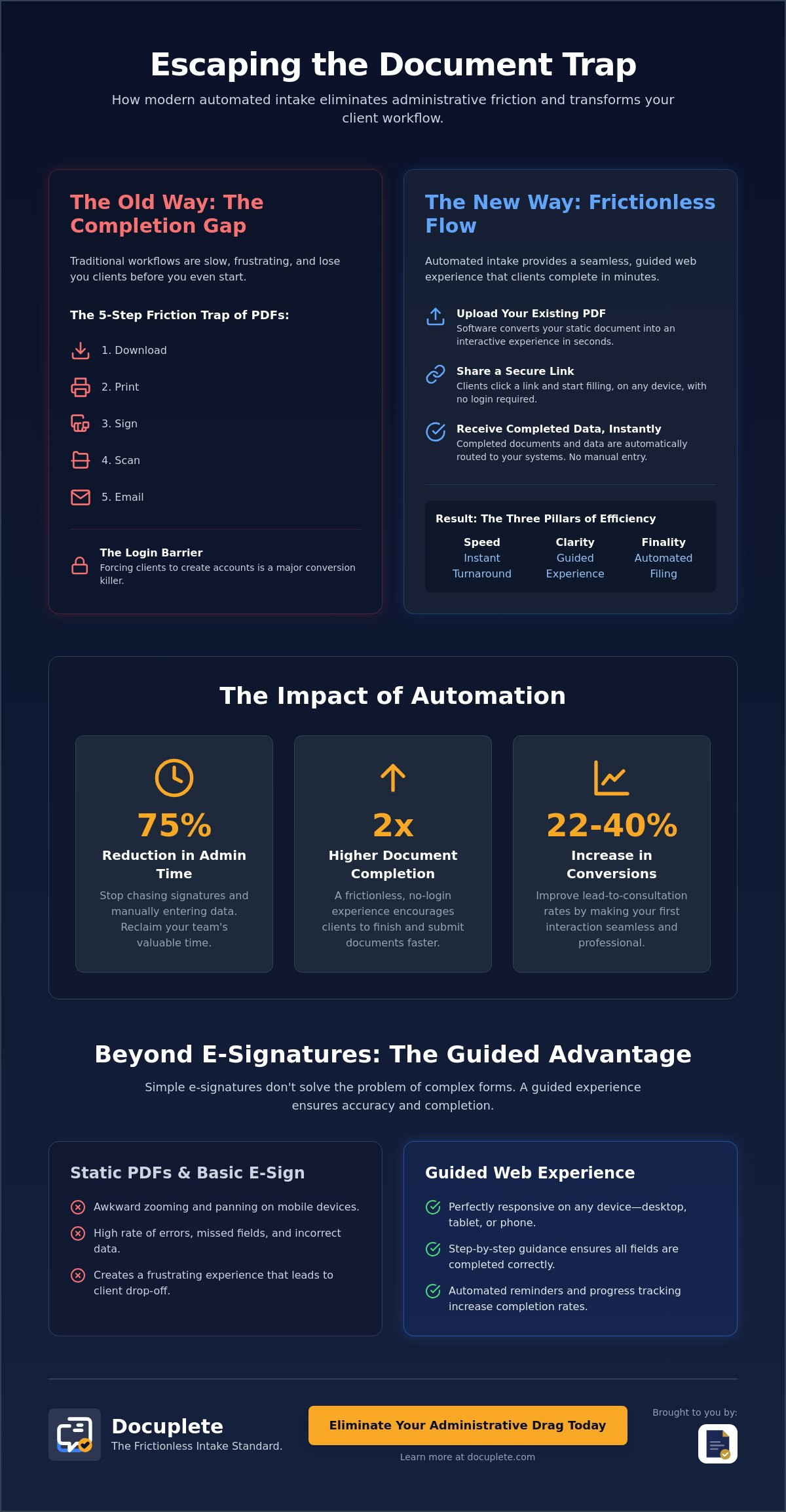
Efficiency in 2026 requires three specific pillars. Speed. Clarity. Finality. If your process lacks these, you are losing revenue. The goal is to move from inquiry to engagement without a single manual touchpoint. This is the core objective of document automation. By removing the need for manual data entry, you restore order to your workflow and give your team their time back.
Why Static PDFs Are Killing Your ROI
Traditional PDFs are a bottleneck. They require a specific, outdated sequence: download, print, sign, scan, and email. This is a five-step friction trap. In a mobile-first world, this workflow is a relic. Most clients now handle their business from smartphones. Standard PDF form fields are notoriously difficult to navigate on small screens. They don't scale. They don't respond. They frustrate. This frustration leads to immediate prospect drop-off. When a client struggles to open or edit your file, they stop seeing you as a solution. They see you as a chore.
The Login Barrier: A Conversion Killer
Many intake platforms require clients to create an account before they can see a document. This is a major conversion killer. Every new password is a reason to quit. The psychology of client resistance is simple: people value their time above all else. Mandatory logins create a high-friction entry point that most busy professionals cannot afford. While some platforms focus on "organizing" your intake, they often ignore the psychological barrier they've built for the client. "No-Login" access is now the standard for professional services. It allows clients to complete their tasks instantly. No barriers. No frustration. Just results.
How Automated Intake Software Transforms Your Workflow
Traditional intake is a black hole. You send a file. You wait. You hope. Modern systems change this dynamic entirely. They turn a static document into a live data stream. This is the core power of automated client intake document software. It replaces the act of "sending a file" with the act of "sharing a process." You gain visibility. You gain speed. You gain control.
The transformation begins the moment you upload a document. The software doesn't just store the file. It analyzes it. It understands the structure. It prepares the data for a frictionless transition. This shift from a document-centric model to a data-centric model is what separates high-growth firms from those stuck in administrative cycles. Research indicates that firms automating these processes can see lead-to-consultation conversion rates improve by 22-40%.
From Upload to Link in Seconds
The process starts with your existing PDFs. The software scans the document. It identifies form fields. It maps out the logic. In seconds, your static file becomes a guided web experience. This isn't a simple digital overlay. It is a responsive interface. Clients don't have to zoom in on tiny boxes. They don't have to struggle with formatting. They just follow the prompts. You can customize the branding to ensure professional trust remains high throughout the interaction. If you're ready to see this transition in real-time, you can explore how modern platforms handle document routing and conversion.
The routing logic is where the real efficiency happens. Imagine a completed form automatically appearing in your practice management software. No staff intervention required. The data is pulled directly from the fields. It populates your database instantly. This is the ultimate goal of automated client intake document software. It eliminates the "administrative drag" that plagues traditional offices. You move from a state of chaos to a state of calm control. No more manual entry. No more copy-pasting. No more human error.
The Power of Automated Reminders
Visibility is the ultimate advantage. You know exactly when a client opens the link. You know where they stopped. You know if they're stuck. Intelligent follow-ups handle the "chase" for you. They send reminders based on specific client behavior. If a document hasn't been signed, the system nudges the client. Setting expiration dates adds a layer of urgency. It moves the process toward finality. You stop being a debt collector for information and start being a professional who values their time.
Beyond E-Signatures: The Guided Completion Advantage
E-signatures are the final step. Completion is the real challenge. Most platforms focus on the signature. They ignore the friction of the data entry that comes before it. True automated client intake document software solves the entire journey. It isn't just about a digital ink mark. It's about a guided path from start to finish. You need a system that handles the heavy lifting of data collection while the client is still engaged.
The biggest objection to digital intake is complexity. Professionals often believe their forms are too nuanced for a web experience. This is a misconception. Complexity is exactly why you need automation. A logic-based system filters the noise. If a client selects "Single" on a marital status field, the spouse section vanishes. The form stays lean. The client stays focused. The process moves toward finality without the overwhelm of irrelevant questions.
The result is the 'Final Signed PDF.' Even though the client completes the form via a responsive web interface, the output remains professional. The data maps back to your original legal format. It looks exactly like your template. It is familiar. It is compliant. It is ready for your files. You get the speed of a modern web form with the authority of a traditional document.
Validation Rules: No More Incomplete Forms
Incomplete forms are a drain on your resources. They force your team into a cycle of manual follow-ups. Validation rules eliminate this waste. Required fields ensure every critical box is checked before the client can submit. The software validates formats for emails, phone numbers, and sensitive data like social security numbers. This prevents typos at the source. You receive clean, actionable data. No more "N/A" clutter. No more missing signatures. Just completion.
Mobile-First Design for On-the-Go Clients
Clients don't wait for a desktop computer to handle paperwork. They use their phones. In 2026, text-to-sign is the dominant preference for busy professionals. It meets the client where they are. It outperforms email because it cuts through the inbox noise. A responsive design ensures your automated client intake document software works on any screen size. This creates a "one-handed" intake experience. Clients can fill, sign, and submit in minutes while they are on the move. Speed creates conversion. Simplicity creates trust.
Strategic Implementation: Choosing the Right Software
Choosing the right platform is a high-stakes decision. It isn't about features. It's about outcomes. Evaluate your options based on 'Time to First Document' (TTFD). This metric measures how quickly you can move from a blank screen to a live, sent document. Speed matters. If the setup takes weeks, the tool is a burden. If it takes minutes, it's an asset. Every second saved in the setup phase is a second earned in the execution phase.
Perform a strict cost-benefit analysis. Compare SaaS fees against administrative hours. Research indicates that automating intake can reduce staff time spent on these tasks by 65-75%. Calculate the hourly rate of your staff. Multiply it by the hours saved. The ROI becomes clear. You aren't just buying automated client intake document software. You're buying back your team's time. This is a pragmatic investment in your firm's growth. High-level executive decisions should always prioritize this type of operational clarity.
Integrating with Your Existing Tech Stack
Customization is key. You need a developer API for document signing to build custom workflows. This allows you to connect intake forms directly to your CRM or cloud storage like Google Drive or Dropbox. Automated routing ensures that once a client finishes, the file lands in the correct folder. No manual dragging. No lost files. No friction. The logic is simple. The execution is flawless. Ready to scale? Check out our API documentation and integration options today.
Security and Compliance Standards
Security is non-negotiable. Prioritize SOC2 compliance and encryption standards. Since we advocate for a no-login experience, security must be handled through unique, encrypted tokens. These tokens ensure that only the intended recipient can access the document. Audit trails provide a clear record of who signed, when they signed, and their IP address. This is the foundation of professional trust. Secure the data. Protect the client. Maintain compliance.
Data retention policies must be equally robust. Your software should allow you to define how long sensitive information is stored. This ensures you meet industry regulations without hoarding unnecessary data. Clean. Secure. Professional. Every word, every token, and every link must earn its place in your security protocol.
Docuplete: The Frictionless Intake Standard
Administrative friction is a choice. You can continue chasing signatures, or you can automate the process. Docuplete is the solution built for professionals who value movement over maintenance. It represents the pinnacle of automated client intake document software. Our philosophy is simple. Eliminate barriers. Restore order. Drive finality. We don't just provide a tool; we provide a path to a cleaner workflow.
The core competitive advantage is our "No-Login" approach. Most platforms prioritize their own ecosystem by forcing your clients to create accounts. We prioritize your completion rate. Your clients don't need a new password. They don't need a tutorial. They just need a link. By removing the login barrier, you reduce the psychological resistance that causes document abandonment. You get the data you need without the friction they hate. It's a sophisticated solution for a modern, digital-first world.
Converting your existing assets is effortless. You don't need to redesign your forms from scratch. Upload any PDF. Our system identifies the logic and maps the fields. It builds a guided web experience that feels native to any device. The end result is exactly what you require: a perfectly signed, compliant PDF returned directly to your inbox. It is the bridge between modern web efficiency and traditional professional standards. You keep the format you trust while gaining the speed you need.
Efficiency First: The Docuplete Difference
Our workflow follows a strict three-step sequence. Upload a PDF. Send a unique link. Get the signed file. Done. There is no bloat. There is no unnecessary preamble. We've eliminated the need for client-side software. Your clients don't need to install PDF editors or specialized apps. This is the pragmatic choice for modern professional teams who want to double their document completion rates. It is lean. It is high-impact. It earns its place in your tech stack every single day.
Getting Started in Minutes
Onboarding shouldn't be a project. It should be a transition. Our low-friction process ensures your staff can start sending documents on day one. We offer a 14-day free trial on our plans, allowing you to test the velocity of our platform without risk. Whether you are a single user or an enterprise team managing thousands of sessions, the system scales with you. It is reliable. It is secure. It is focused on utility rather than hype. Stop managing the mess. Start managing the growth. The tools you choose define the speed of your firm. Choose the standard that prioritizes finality. Start streamlining your client intake with Docuplete today.
Master Your Administrative Velocity
Friction is a choice. Order is a strategy. Legacy processes drain your ROI and frustrate your clients. By implementing automated client intake document software, you shift from administrative chaos to operational excellence. You reclaim up to 75% of your staff's time. You eliminate the "completion gap." You prioritize results over paperwork. This is the new standard for professional services in 2026.
Docuplete is the standard for high-velocity firms. Convert any PDF into a guided web experience in seconds. Remove the login barrier for your clients. Ensure every transaction is protected by secure SOC2-compliant document handling. This isn't just about digital forms. It's about a zero-friction experience that drives finality. You get clean data. You get signed files. You get your time back. The process is lean, secure, and professional.
Your time is your most valuable asset. Stop managing the mess and start managing the growth. Streamline your intake with Docuplete and experience the relief of a truly frictionless workflow. The future of your firm depends on the speed of your operations. Build it today. You've seen the path to efficiency. Now, take the first step toward a cleaner, faster future.
Frequently Asked Questions
Is automated client intake software secure for sensitive legal or medical data?
Yes. Professional platforms prioritize security through SOC2 compliance and end-to-end encryption. Sensitive data is protected using unique, encrypted tokens for every session. This ensures that only the intended recipient can access or edit the information. You maintain a secure, professional environment without the friction of traditional logins.
Do my clients need to download an app or create an account to sign?
No. Modern automated client intake document software uses a no-login philosophy. Clients simply click a secure link sent via email or text. The document opens in their mobile or desktop browser instantly. There are no passwords to remember. There are no apps to install. Just click, fill, and sign.
Can I turn my existing complex PDFs into guided web forms?
Yes. The software identifies existing form fields in your current PDFs and converts them into a responsive web experience. You don't need to redesign your documents. The client completes a guided, step-by-step process. Once they finish, the data maps back to your original PDF format for a professional, familiar result.
How does automated routing for completed documents work?
Routing logic moves finished files to your destination of choice automatically. You set the rules. Once a client submits a document, the system sends it to your CRM, Google Drive, or Dropbox. This eliminates manual file management. It ensures your team always has the latest version in the right place without lifting a finger.
What is the difference between an e-signature platform and intake software?
E-signature tools focus only on the final signature. Intake software manages the entire completion journey. It handles data validation, conditional logic, and automated follow-ups. While e-signature is a component, automated client intake document software ensures the form is actually finished correctly before the signature is ever requested.
Can I send intake forms via text message (SMS)?
Yes. Text-to-sign is a core feature for modern workflows. Sending a link via SMS bypasses crowded email inboxes and speeds up the completion process. Clients can complete their paperwork in minutes while on the move. It is the most efficient way to reach clients in a mobile-first world.
How much time can my team save by automating document intake?
The time savings are substantial. Research indicates that automating these administrative tasks can reduce staff time by 65-75%. Your team stops chasing signatures and starts focusing on high-value work. You eliminate manual data entry, reduce human error, and restore order to your office operations.
Does the software provide an audit trail for signed documents?
Yes. Every signed document includes a comprehensive audit trail. This record tracks the signer's IP address, timestamps, and verification methods. It provides a legally defensible history of the transaction. You get the security of a traditional paper trail with the speed and cleanliness of a digital-first workflow.