
Your clients are ignoring your contracts because your mobile experience is broken. They open an email. They see a static PDF with microscopic text. They are asked to download an app. They are forced to remember a password. Most just close the tab. Achieving true fast document signing for mobile requires more than a digital signature. It requires the total removal of technical hurdles.
You understand the frustration of chasing signatures that should take seconds but take days. You've seen the high abandonment rates when recipients hit a login wall. It's a drain on your operations. It's a drain on your revenue. You need a process that works as fast as your business moves.
This guide will show you how to eliminate signing barriers and enable instant, app-free document completion on any device. We'll examine the shift toward browser-based flows, zero-login security, and the automated routing needed to hit 100% mobile compatibility in 2026. It's time to restore order to your workflow and get your contracts across the finish line.
Key Takeaways
- Eliminate app fatigue. Most mobile signing attempts fail because users refuse to download software or manage new passwords.
- Achieve true fast document signing for mobile by switching to a browser-based workflow. No accounts. No logins. No delays.
- Audit your recipient journey. Count every click from the initial notification to the final signature to identify where friction kills your completion rate.
- Transform static PDFs into fillable web forms. This ensures documents remain legible and interactive on small screens without zooming or scrolling.
- Leverage zero-friction technology to ensure 100% accessibility. Ensure every client can sign instantly, regardless of their technical expertise.
The Mobile Signing Speed Trap: Why Most Solutions Fail
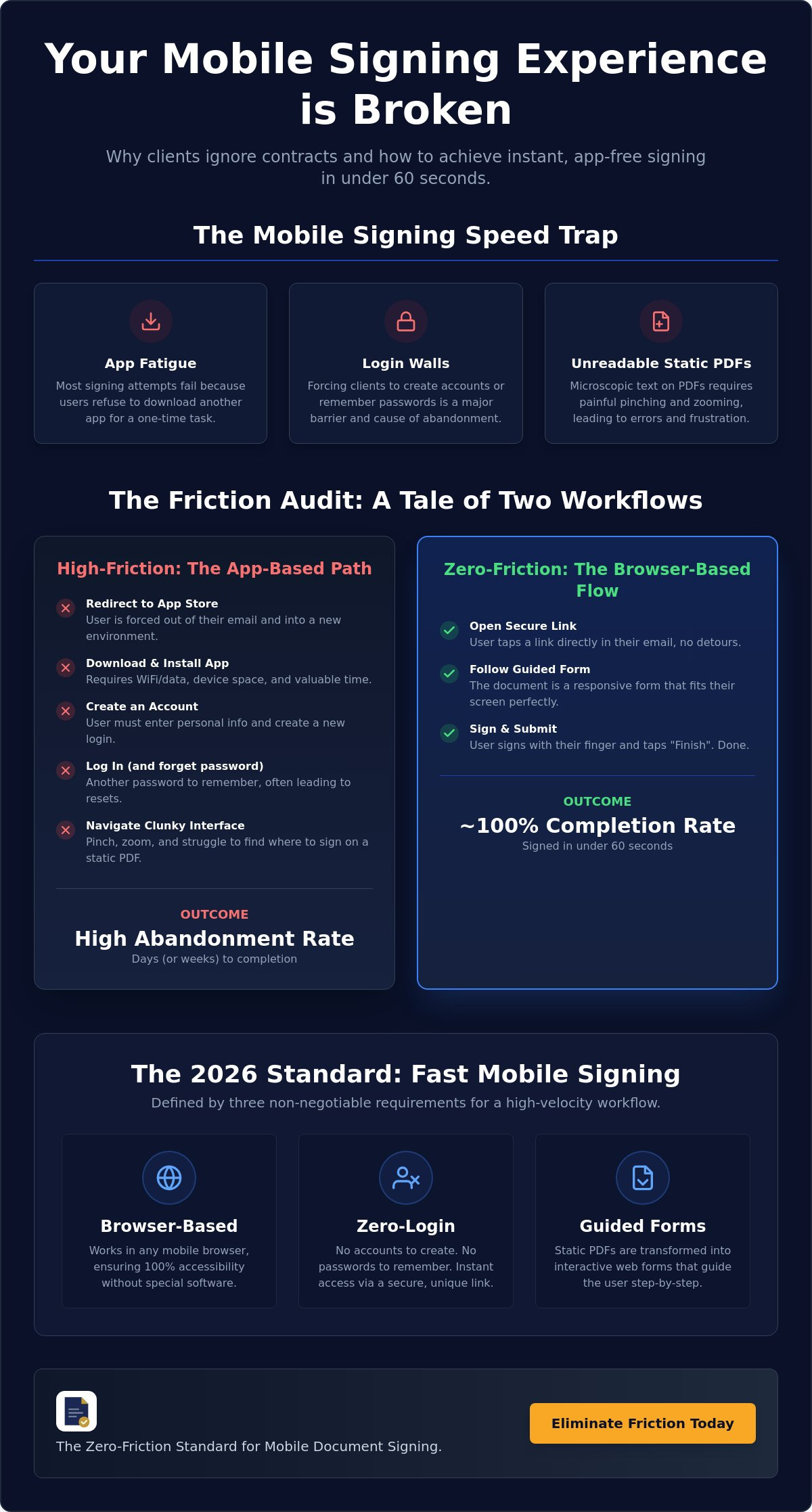
Most document platforms are built for desktops. They assume the recipient has a large monitor. They assume the recipient has a mouse. These assumptions are wrong. In 2026, business happens on glass. If your process requires a download, you've already lost. True fast document signing for mobile isn't about how quickly you send the file. It's about how quickly they can finish it. Most solutions focus on the sender's convenience. They offer robust dashboards and complex tracking. But they ignore the person who actually matters: the signer. When the signing experience is clunky, completion rates plummet. You send an email. The client opens it. They see a wall of text. They see a login screen. They close the tab. This is the speed trap. You think your workflow is efficient, but your results prove otherwise.
The Hidden Cost of Friction
Friction is the silent killer of contracts. A 30-second app download feels like an hour to a busy executive. It's an interruption. It's a barrier. When you force a client to visit an app store, you create a reason for them to quit. Data shows a direct correlation between login requirements and document abandonment. Every field, every password, and every "create account" prompt adds drag. To understand the legal weight of these digital marks, one must understand what is an electronic signature in a modern context. It's not just a squiggle on a screen. It's a legal commitment that should be effortless. Traditional e-signatures fail the "thumb test." If a user has to pinch their screen to find the "Sign Here" button, your workflow is broken. They will wait until they are back at their desk. Or they will forget entirely. Neither outcome helps your bottom line.
Mobile-First vs. Mobile-Friendly
There is a massive difference between a shrunk-down PDF and a responsive form. "Mobile-friendly" usually means the recipient can technically see the document. "Mobile-first" means they can actually use it. Static PDFs are rigid. They are difficult to read on a five-inch screen. They lead to user error and frustration. A browser-based approach is the professional standard for 2026. It removes the need for specialized software. It eliminates the "I'll do this when I'm at my computer" excuse. Achieving fast document signing for mobile means meeting the client where they are. You convert a static file into a guided experience. You ensure 100% accessibility. You move from a state of frustration to a state of completion. Velocity is the goal. Simplicity is the method. Remove the hurdles. Restore the flow. Get the signature.
What is Fast Document Signing for Mobile?
Fast document signing for mobile is a specialized digital workflow. It allows recipients to execute legally binding documents directly within their mobile browser. It's not an app store detour. It's not a desktop experience squeezed into a phone screen. This is a purposeful engineering of the signing journey. True speed is measured by the time elapsed from opening the link to final submission. In 2026, the professional standard for excellence is completion in under 60 seconds. If a transaction takes longer, friction is present. You lose the momentum of the deal.
Three non-negotiable requirements define this high-velocity standard. No software downloads. No account creation. No login barriers. If your client has to remember a password or visit an app store, you've already failed the speed test. The core technology relies on HTML5-based guided forms. These forms are intelligent. They adapt. They reflow. They ensure the document fits the device, regardless of screen size or orientation. This is fast document signing for mobile in its purest form. It moves your business forward without the administrative drag.
The Anatomy of a High-Speed Signature
High-speed signatures begin with a secure, unique document link. This link is the single point of entry. It provides instant access without unnecessary gatekeeping. Once the link is opened, the user isn't left to wander through a static page. The interface takes control. Guided fields walk the user through the document step-by-step. This eliminates the "Where do I sign?" confusion. Automated data validation works in the background. It prevents missing signatures. It catches incorrect information before the user can hit submit. It ensures the first submission is the final submission. No back-and-forth. No corrections. No wasted time.
Why Guided Web Forms Win
Static documents are a liability on mobile. Converting PDFs to guided web forms is the only pragmatic strategy for modern operations. This conversion significantly reduces cognitive load. The signer doesn't have to hunt for fields or zoom in on microscopic fine print. They simply follow the prompts. Today's workforce expects fast, mobile-first solutions that respect their time and device constraints. The final output remains a legally compliant, signed PDF. You get the professional result your business needs. Your clients get the frictionless experience they want. You can start building these high-velocity workflows today with a Docuplete platform subscription.
App-Based vs. Browser-Based Signing: The Friction Audit
The "Time to Sign" metric is the only one that matters. If you want to understand why your completion rates are stalling, you must conduct a friction audit. This process tracks the recipient journey from the first notification to the final confirmation. It reveals exactly where your clients lose interest. For most businesses, the bottleneck is the platform itself. Choosing between an app and a browser isn't just a technical preference. It's a strategic decision that dictates your revenue velocity. True fast document signing for mobile eliminates every unnecessary step. It prioritizes the recipient's time over the vendor's ecosystem.
Friction audits quantify the cost of complexity. In a high-volume client intake environment, a single extra click can lead to a measurable drop in conversions. When you multiply that by hundreds of monthly contracts, the loss is significant. You need a workflow that supports instant delivery via SMS or text. You need a process that respects the mobile user's reality. Speed is the byproduct of simplicity. Order is the result of automation.
The App-Based Journey (High Friction)
Traditional e-signature giants force your clients into their walled gardens. This creates a high-friction loop that kills momentum. The journey is predictable and painful. Step 1: Open the email. Step 2: Click the document link. Step 3: Redirect to the App Store. Step 4: Download the software. Step 5: Create a new account and password. Step 6: Verify the email address. This process typically requires 6 to 10 minutes of setup before the first signature is even possible. For a busy professional on a mobile device, this is an eternity. It's a reason to quit. It's a reason to wait until they are back at a desk. High-volume intake cannot survive this level of drag.
The Browser-Based Journey (Docuplete Style)
The alternative is a streamlined, browser-first approach. It leverages instant delivery to bypass the crowded inbox. The steps are minimal. Step 1: Open the text or email. Step 2: Click the unique link. Step 3: Sign. Total engagement time is under 60 seconds. There are no downloads. There are no logins. There are no barriers. This is the new automated client intake document software standard. By removing the app store from the equation, you ensure 100% accessibility for every user. You move from a state of chasing signatures to a state of receiving them. Speed isn't a luxury. It's a requirement for fast document signing for mobile in a digital-first economy. Audit your current process. Count the clicks. If the number is higher than three, you are losing money.
How to Set Up an Instant Mobile Signing Workflow
Efficiency is a choice. You can engineer it. Setting up a workflow for fast document signing for mobile requires a shift from static files to dynamic streams. It's about moving data, not just pictures of paper. The process is linear. It's logical. It's final. You want to move from a state of chasing clients to a state of receiving completed contracts. Follow these three steps to eliminate the administrative drag from your operations.
Step 1: Conversion and Automation
Start with your source. Upload your existing PDF to a document automation platform. Don't just present the file; transform it. You must convert the static layout into a guided, fillable web form. This allows you to set up conditional logic. If a field isn't relevant to a specific client, the user never sees it. You reduce the cognitive load. You reduce the effort required to finish. Guided forms are the bridge between PDFs and web data. This conversion ensures the document adapts to the user's device, not the other way around. It turns a complex legal document into a simple, mobile-friendly sequence.
Step 2: Distribution via SMS and Email
Delivery is the next hurdle. Email is standard, but it's often buried in a crowded inbox. SMS is the high-velocity alternative for modern business. Industry data suggests that SMS links have a 98% open rate. This is a massive advantage over traditional email channels. Your message must be brief. It must be branded. It must encourage immediate action. Distribute the document via a simple, secure link. Ensure the link is unique to the recipient. This prevents unauthorized access. It creates a direct path from the notification to the signature. It moves the contract from their pocket to your "completed" folder in record time.
Step 3: Tracking and Finalization
Visibility is control. You need real-time data on every document you send. See who has opened the link. Identify who has started but stopped. Automated tracking removes the need for manual follow-up. Set up reminders to nudge slow signers automatically based on their behavior. Once the signature is captured, the system routes the file. You receive the finalized, signed PDF in your inbox automatically. The document is stored in a secure, tamper-evident environment. The loop is closed. The order is restored. You can sign up for a Docuplete platform subscription to automate this entire cycle today.
Docuplete: The Zero-Friction Standard for Mobile
Complexity is the enemy of completion. Every extra step you demand from a client is a chance for them to walk away. We've established that app downloads and login screens are the primary drivers of document abandonment. Docuplete was engineered to solve this specific failure. It removes the app store from the equation entirely. It eliminates the need for passwords. It restores order to your administrative workflow by prioritizing the recipient's ease of use. This is the zero-friction standard for 2026.
Achieving fast document signing for mobile is no longer a technical challenge. It's a strategic choice. By utilizing no-login technology, you ensure 100% accessibility for every user. It doesn't matter if your client is a tech-native executive or a non-tech-savvy individual. The interface is intuitive. The path is clear. The result is a legally binding signature captured in seconds. You move from a state of frustration to a state of total control. You stop managing excuses and start managing growth.
Results-Oriented Document Automation
Stop chasing signatures and start receiving completed files. Docuplete provides a guided experience that feels more like a modern web form than a static contract. Think of it as a "TurboTax-like" experience for any PDF. Your clients follow a logical sequence. They provide the necessary data. They sign. The clean, professional interface reflects well on your brand. It signals that you value your client's time. It positions your business as a modern, digital-first operation. This is the pragmatic choice for teams that demand high ROI and immediate results. Efficiency isn't just about speed; it's about the professional delivery of your services.
Ready to Kill the Friction?
The transition to a high-velocity workflow is immediate. You can get started with a Docuplete platform subscription in under five minutes. There is no complex integration required to begin sending frictionless documents. Experience the difference of a no-login e-signature platform. Watch your completion rates climb as you remove the technical hurdles that hold your clients back. It's time to eliminate the "I'll do this later" response. It's time to close deals on the first attempt. Try Docuplete for fast mobile signing today. Capture the signature. Finalize the contract. Get back to work.
Eliminate the Friction Today
Administrative drag is a choice. You can continue chasing clients through app store downloads and login walls. Or you can implement a fast document signing for mobile workflow that prioritizes speed and accessibility. The standard for 2026 is clear. Move your contracts to the browser. Convert your static PDFs into guided forms. Remove every barrier between your client and the finish line.
Order replaces chaos when you automate the recipient journey. You gain real-time visibility through secure document tracking and routing. You ensure 100% compatibility with every mobile device. Most importantly, you reclaim the time wasted on manual follow-ups. A no-login e-signature platform isn't just a technical upgrade. It's a strategic advantage that increases your revenue velocity and improves client satisfaction.
The tools for total efficiency are ready. Stop fighting your workflow and start optimizing it. Start your frictionless signing workflow with Docuplete and experience the relief of a zero-barrier process. Your business deserves a modern solution. Your clients deserve a professional experience. Take the final step toward completion now.
Frequently Asked Questions
Do my clients need to download an app to sign documents on mobile?
No, your clients do not need to download any software. True fast document signing for mobile happens directly in the recipient's mobile browser. This eliminates the friction of visiting an app store and managing new accounts. It ensures immediate access to the contract. It respects the client's device space and time.
Is signing a document on a mobile browser legally binding in the US?
Yes, signatures captured via a mobile browser are fully legally binding. They are protected under the federal ESIGN Act and the Uniform Electronic Transactions Act (UETA), which has been adopted by 49 states. These laws ensure that electronic signatures carry the same legal weight as traditional wet-ink signatures. The platform captures a comprehensive audit trail to verify intent and identity.
How do I send a document for signature via text message?
You send a document via text by generating a unique, secure link through your document platform. Paste this link into an SMS message to your recipient. This method bypasses crowded email inboxes and leverages the high open rates of mobile messaging. It's a direct, professional way to move contracts toward completion without administrative delay.
Can I track if a client has opened the document on their phone?
Yes, you can monitor the status of your documents in real time. The system alerts you the moment a recipient clicks the link on their mobile device. This visibility allows you to see who has viewed the document but hasn't yet signed. It provides the data you need to time your follow-ups effectively and maintain deal momentum.
What happens if a client loses their internet connection while signing?
If a client loses their connection, modern platforms utilize auto-save technology to protect their progress. The recipient can simply click the original link once their signal is restored to pick up exactly where they left off. No data is lost. No fields need to be re-entered. The process remains streamlined and frustration-free for the user.
Is a no-login e-signature platform as secure as app-based solutions?
Yes, no-login platforms provide enterprise-grade security without the barrier of a password. They utilize unique, tamper-evident tokens and encrypted links to ensure that only the intended recipient can access the file. This approach follows the zero-friction standard. It provides a secure audit trail and identity verification while removing the technical hurdles that cause document abandonment.
How do I convert my existing business PDFs into mobile-friendly forms?
You convert existing PDFs by uploading them to an automation platform and mapping the fields to a guided sequence. This transformation ensures fast document signing for mobile by making the content responsive to different screen sizes. You turn a static, rigid file into a dynamic web form. This ensures your clients can read and sign without pinching or zooming.